Make it Visible
As your team gets bigger, nobody wants to add a lot of process. But work is piling up and leaders can't visit every team at sprint planning. Build a different view to enable fast synchronization.
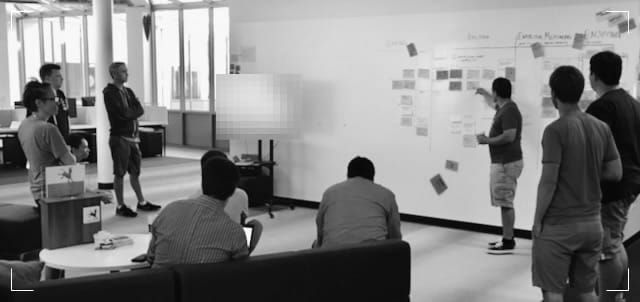
Hey, friends - this one has some older photos because my peak experience with this play was way back in the ancient times of 2016. I'm torn about whether older photos of messy boards help or hurt the perceived value of the Playbook - please let me know what you think.
Context
A growing company with 3-5 development teams, a handful of product managers, and up to about 50 people working on products. (Or a similarly sized division in a bigger company). As a product leader, you can't keep up with all of the sprint meetings anymore, and team members feel they're losing sight of what everyone is up to.
Discussion
In the early stages of a startup or a team, it's easy for everyone to participate in the daily meetings or sprint events. But as things get bigger, you face a conundrum. You can't make it to all of the meetings, but nobody wants to add a lot of process. So you cling to the old way of working for longer than you should. Maybe the founder is dropping into daily standups once a week and it's taking a long time to catch then up. Maybe work is piling up in the individual teams.
Play
Make work visible. But think bigger than stories and sprints. Set up a feature-level Kanban board to track work across teams. Gather leaders once a week around the board to share progress, learnings, and uncover problems.
When I was at Jama Software, a B2B SaaS startup in Portland, Oregon, we had just moved into a new building, thoughtfully designed with an enormous whiteboard wall and open area right between the desks for product and engineering. This wall was a natural place to start building a visualization.
I started out by inviting each PM to walk to the wall with me, one at a time, over a week or so. I asked them what features they were working on, and wrote them on stickies. We started out with a simple flow - Explore, Build, Measure, Fix, and Enjoy:
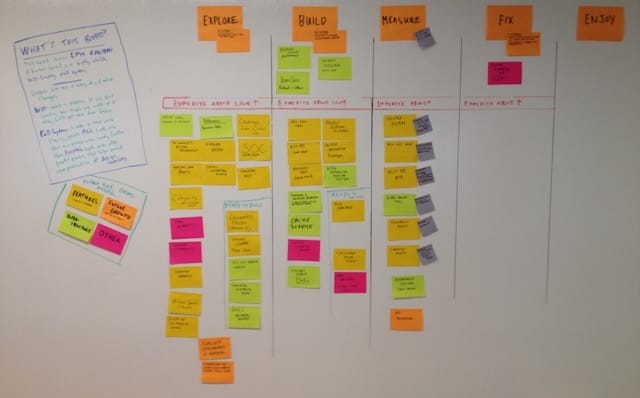
As Director of Product, the column I cared about the most is 'Measure' (see the play Learning, not Failure). Sometimes it was hard for the PMs to remember what they were measuring on the spot every Friday, so we added some smaller stickies there to indicate the success criteria for each feature.
Weekly Review
We met each Friday morning at 9:30, after the daily standups were over, and walked the board right to left. First, if anything had met all success criteria, we moved it to the 'Enjoy' column, and took a moment to celebrate.
Next, we heard from PMs who had items in Fix and Measuring. What had we learned this week? Were changes needed? Were those changes successful? In many companies, delivered features that are slightly broken or not totally effective stay in this state for a very long time, if not forever. Having this conversation every single week created a sense of urgency around learning and actually completing work - getting to 'done done'. There was a social pressure to show progress at this stage – a pressure that does not exist in many organizations.
Then, we moved on to Building, discussing what would be deployed soon.
Improving the Flow
In a later version of the board you can see the queue of items ready to be toggled on, inside of the Building column:
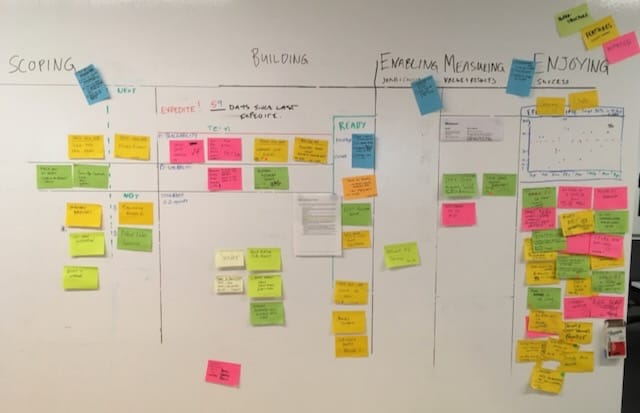
You'll also note this picture, taken 7 months after the first one, shows quite a different board.
- Exploring is now called 'Scoping'
- There is a new 'Enabling' column, because we realized that we had to take steps to support sales, marketing, and customers with each new feature
- There is a hand-drawn lead time scatter chart, which is surprisingly easy to make
- We leave 'done' stickies in the Enjoying column until they fall off of the wall. We do this to remind ourselves that we've completed a lot of stuff (see the Zeigarnik Effect)
- We've added thematic swimlanes, but only for the first half of the board. (We didn't feel this was as important in the later stages)
All this is really easy when you make a visualization on the wall or in Miro, but very difficult in ticket tools like Jira, where renaming states has ripple effects and you can't visualize the whole board all at once. That's not a knock on Jira - it's a useful tool. But it doesn't give you a feeling for what's going on.
And if you hold a weekly review around a Jira board, it's going to be about as exciting as... a daily meeting around a Jira board.
Benefits
What changes when you make work visible on a feature-level kanban?
- With just one 10 minute meeting per week, everyone can feel up-to-date on what's going on
- Emphasis on results and impact by talking about measurements and follow-up first
- Bottlenecks, stuck work, and overload are obvious to everyone and addressed quickly
- Senior execs can drop in at random and understand the conversation because it's at a good level of abstraction
- People can inform themselves on status without scheduling meetings
- Cross-team peer pressure encourages everyone to prepare and do the right thing.
Cautions and Caveats
Distributed Teams
If your team is distributed across many cities it's tempting to use the board views in Jira. The downside of these views is that they only show 10-20 items on screen at a time. So you don't see the total workload, and it is much harder to see the patterns and notice stuck items.
It's better to build a visualization in Miro/Figjam/etc. With Miro, you can use the sticky notes, the card object, or the Jira integration. The Jira integration forces your board into the shape Jira wants, so I favor the card update. This requires manual updates, but your team can handle it for the small number of moves each week. This is one of those situations where a few minutes per week of updates can have very large effects on the overall speed of work, because you catch and respond to delays much earlier.
Collocated Teams
If you're the senior leader, and you have a physical board, try not to move the cards yourself. Each time you do this, it becomes a little bit more 'your board'. Instead, ask the PMs to move the cards during the weekly review. (I make an exception if someone is out on vacation)
You can put a few things on the sticky note. In the board at Jama we wrote down the day the item went into 'Building' so we could easily update our scatter plot when the item reached the end.
But you can't put everything on the sticky, and you'll want some software to track the details. These days I favor a feature writeup in a system designed for text collaboration, like Notion or Confluence, over a ticketing system like Jira. (You can still use Jira, but it's not great for discussing features because the comments stick around forever)
Participation
Invite your execs to drop in to this meeting from time to time. They'll feel more connected to the work that the team is doing and gain confidence that you're doing the right things.
Invite someone from the customer support team to join to make sure that feedback on new features is being properly integrated.
Invite someone from sales (or a technical account manager) to join so that they know what features are coming out next, and so they can share the load of keeping the sales team up-to-date. Over time they will also start to spot needed product marketing activities in the upstream items for you.